Vibe Coding A Coding Harness
Writing your own coding harness when mature ones already exist sounds counterintuitive. I did it for two reasons: to see how a frontier model - Opus 4.7 - would fare at a seriously code-intensive task, and to learn the nuances of rolling my own.
An atelier is the private workshop or studio of a professional artist - and the name I chose for the coding harness I built (source on GitHub).
Anatomy of Coding Harnesses
A coding harness is the scaffolding around an LLM that turns it from a text generator into an agent that can actually edit code, run it, and iterate. The essential components:
Model interface. The connection to the LLM itself: API client, request batching, streaming, retry logic, and handling of context-window limits. This is also where you set sampling parameters and manage cost/latency tradeoffs.
System prompt and instructions. The layered prompting that tells the model its role, the rules it must follow, the format of tool calls, and the task at hand. Often split into a base system prompt, a task prompt, and dynamically injected context.
Tool definitions and execution. A schema describing the tools the model can call (read file, write file, run shell command, search, etc.), a parser that extracts tool calls from model output, and an executor that actually runs them and returns results. The parser has to be robust to malformed calls.
Sandbox or workspace. An isolated environment where the agent's code edits and shell commands run. Usually a container or VM with the target repo checked out, plus whatever language runtimes, package managers, and test frameworks the task needs. Isolation matters because the agent will run arbitrary commands.
Context management. Logic for deciding what goes into each model call: conversation history, file contents, search results, test output. This includes truncation strategies, summarisation of older turns, and retrieval (grep, embeddings, AST search) to pull in relevant files on demand.
Control loop. The outer loop that drives the agent: call model, parse output, execute tools, append results, repeat until the model signals completion or a stop condition is hit (max turns, token budget, test passing, error threshold).
Verification and feedback. How the harness knows whether the agent is making progress. Usually running tests, linters, type checkers, or build commands and feeding the output back into the context. On SWE-bench-style tasks this is what closes the loop between editing and knowing the edit worked.
Logging and observability. Traces of every model call, tool invocation, and intermediate state. Essential for debugging the agent, reproducing failures, and computing evals.
Safety and resource limits. Timeouts, command allowlists or denylists, network restrictions, file system boundaries, and budget caps on tokens, wall-clock time, or shell calls. Keeps a misbehaving agent from running away.
Optional but common. subagent orchestration (a planner that spawns workers), memory or scratchpads that persist across turns, and human-in-the-loop checkpoints for high-stakes actions.
A minimal viable harness is really just model interface + tool execution + control loop.
Getting Started - "Meta Prompting"
Having heard good things about Andrej Karpathy's project level CLAUDE.md file, I decided to use this. I also decided to get Claude to come up with a build-out plan, most of which was encompassed in a TODO.md file. The plan was delivered in five phases:
Phase A - Foundation. The runnable harness core:
atelier-core, the §2.5 agent loop, the BYOM adapter trait, Mock/Anthropic/OpenAI-compatible providers, MCP-first tool transport, built-in tools, sandboxing, hooks, persistence, recovery, sessions, and the cost ledger.Phase B - Protocol and trust. Reliability and measurability for model interaction. Typed protocol envelopes, the NativeTool / JsonSentinel / RegexProse strategies, conformance tracking, real-model conformance gates, did-it-do-what-it-said verification, and LSP-backed hallucination detection.
Phase C - Workspace surface. Where the backend becomes a usable workspace: a Tauri/Svelte GUI, a ratatui TUI, live diff display, file-level approval, context/memory/plan panes, cost and context meters, a skills UI, provider visibility, and editable workspace state.
Phase D - Time and steerability. Control over long-running work. Time travel, rewind/fork/merge, interrupt/restart flows, mid-execution steering, and mechanical gates that keep recovery sane across repeated interruptions.
Phase E - Trust calibration and surrounding UI. Higher-level trust and product surfaces: calibrated trust budgets, uncertainty UI, privacy/redaction gates, telemetry, native Bedrock/Vertex adapters, and a model-routing UI for planner / executor / custom-task roles.
Why Write A Harness In Rust?
A harness needs to edit files, run tools, manage subprocesses, persist sessions, recover from crashes, enforce sandbox boundaries, track costs, and verify whether the model actually did what it claimed. Rust is well suited to that job because it combines strong compile-time guarantees with low-level control.
Its type system helps model protocol envelopes, state transitions, tool inputs, verification results, and ledger entries explicitly instead of passing loosely structured JSON through the system. Its ownership and concurrency model make async agent loops, event buses, cancellation paths, file watchers, and subagents easier to reason about. And its performance profile makes it practical to stream events, diff large files, watch repositories, and run long sessions without carrying a heavy runtime.
Most importantly, Rust helps make the dangerous parts boring: atomic file writes, staged edits, path containment, pre-edit hash checks, subprocess control, credential handling, and crash recovery can all be implemented with a strong safety posture.
The system around a harness's design model should be deterministic, auditable, and hard to corrupt - Rust ticks all the boxes that are required in order to achieve this.
The Harness Architecture
This was part of the experience that went particularly well. Opus 4.7 produced:
An elegant architecture which adhered well to the principles of separations of concern and DRY - "Don't repeat yourself".
Python and GitHub Actions testing frameworks.
An experience free from the long-winded debugging loop experiences I had encountered with other side projects.
To dig into the harness's architecture, it is summarised in this diagram:
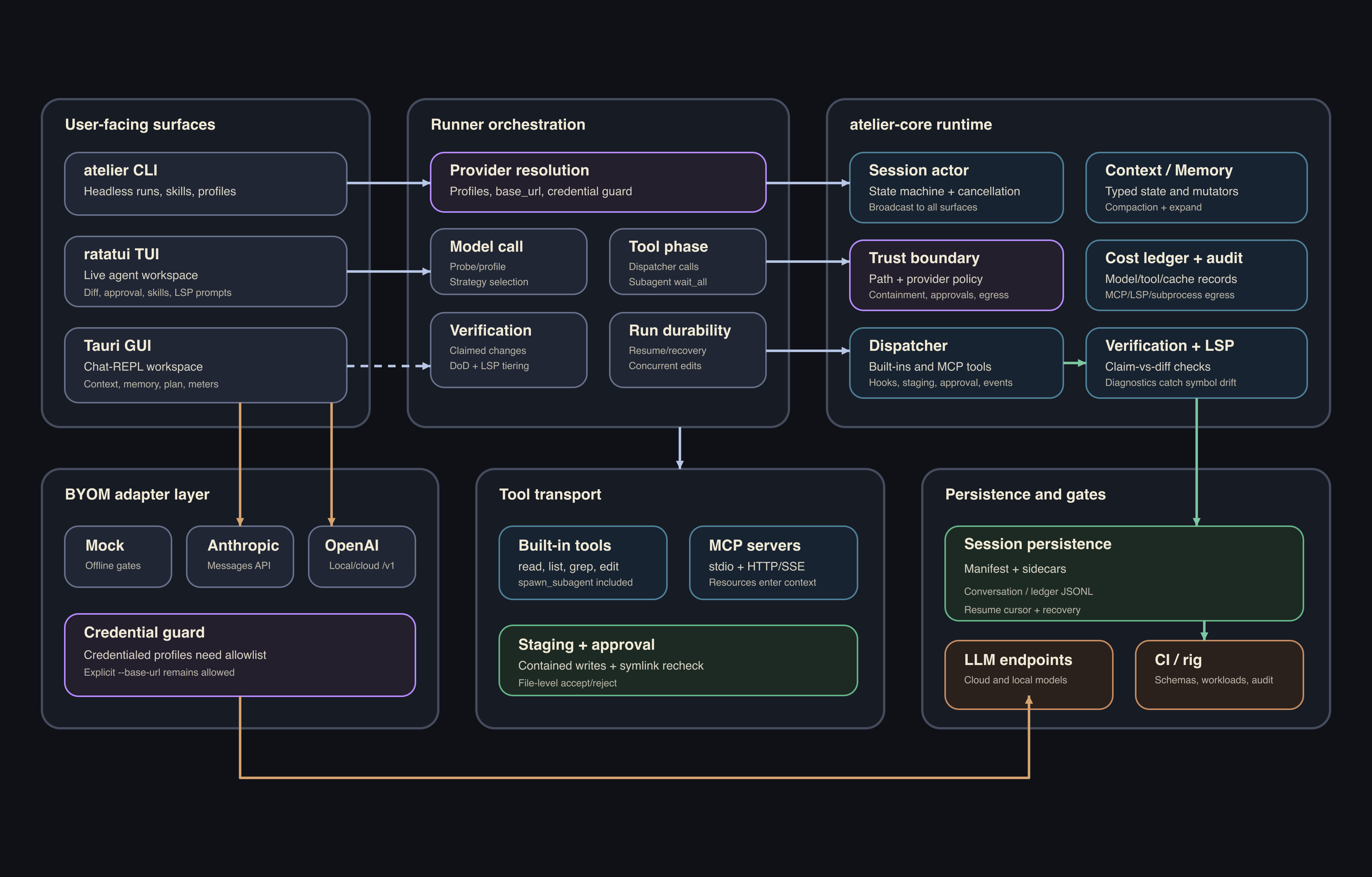
This is the technology stack that the architecture landed on:
| Area | Stack | Role |
|---|---|---|
| Core runtime | Rust 1.85, Tokio, tokio-util, futures, async-trait | Agent loop, session actor, tool dispatch, persistence, verification, and shared runtime logic. |
| Crate structure | atelier-core, atelier-cli, atelier-gui, atelier-tui |
Separates the engine, CLI, desktop GUI, and terminal UI. The core crate holds the agent loop, BYOM adapters, protocol, dispatcher, staging, verification, persistence, and cost ledger. |
| Desktop GUI | Tauri 2.x, Svelte 5, TypeScript, Vite | Native desktop app with Chat/Agent modes, model switching, context, memory, subagents, and model-fit UI. |
| Terminal UI | ratatui, crossterm | Live terminal workspace for agent runs, diffs, approvals, context, memory, and meters. |
| Model adapters | Mock, Anthropic Messages API, OpenAI-compatible APIs (via reqwest, SSE streaming) | Bring-your-own-model support across offline tests, cloud models, and local servers. |
| Local model support | Ollama, LM Studio, llama-server, vLLM, sglang | Runs against local or self-hosted OpenAI-compatible /v1/chat/completions endpoints. |
| Model adaptation | Capability probing, protocol fallback, suitability scoring | Detects model behaviour, chooses between native tools / JSON / prose strategies, and rates Agent-mode fit. |
| Tooling layer | MCP via rmcp, built-in tools, subagents |
Unified dispatch for file tools, shell, AST grep, editing, and delegated subagent work. |
| Persistence & memory | JSON/JSONL sessions, Markdown memory cards, SQLite with FTS5 | Durable resumable runs plus searchable project and user memory. |
| Editing & verification | Atomic staging (similar, tempfile), SHA-256 pre-edit hash checks, tree-sitter syntax checks, LSP diagnostics (async-lsp, lsp-types, tower) |
Safe file edits, syntax-aware checks, conflict detection, and “did it do what it said?” validation. |
| Filesystem & process safety | notify, sandbox profiles, libc process-group kill paths |
File-watch and subprocess control with cleanup of child processes on cancellation. |
| Security boundary | OS keychain (keyring), credential-egress checks, sandboxing, redaction/audit schemas |
Protects API keys, constrains tool execution, scrubs environments, and cleans up child processes. |
| Config & data | TOML, JSON, serde, JSON Schema (jsonschema) |
Provider profiles, typed events, persisted state, and contract-validated artifacts. |
| Observability | tracing, tracing-subscriber, event bus, cost ledger, typed JSON/JSONL artifacts |
Streams runtime activity to UIs and records model/tool cost and diagnostic metadata. |
| Test / rig layer | Python rig with JSON Schemas, pytest, canonical workload fixtures, make check; Rust tests with assert_cmd, predicates, wiremock |
Schema + validator + runner regression alongside the Rust test suite. |
| Frontend extras | Mermaid, Tauri dialog plugin | Diagram rendering and native workspace/folder selection. |
Harness GUI User Experience
One thing really stood out in terms of where my frontier model struggled: coming up with a GUI for the harness that delivered a passable user experience, let alone a polished one. I got there in the end, but not without considerable steering on my part. Left to its own devices, Claude using Opus 4.7 gave me:
Dead panels not wired to any code
Baffling UX choices - such as a "Holding area" that batched up prompts before sending
Overlapping panels
Missing obvious affordances (a token meter, for one)
To give a sense of how much steering this required, here are the seven most significant GUI changes I made - as pulled from the repo's changelog:
v60.43–v60.49 (chat-mode pivot) — The largest single GUI restructure: removed DiffPane, switched layout from CSS grid to flex, added context-usage and cost meters to the footer, right-column collapse toggle, workspace selector, and the serif
  wordmark. Reoriented the whole interface around chat-first use.

v55 (§5 editable round-trips) — Closed the full §5 editing surface across all three panels in both GUI and TUI: Context pin/evict, Memory add/promote/delete, Plan add/status-cycle/constrain/reorder/remove. The biggest single spec closure on
  the UI side.

v56 (per-hunk accept/reject + grounding rationale) — Upgraded DiffPane from file-level to hunk-level approval with @@ headers and −N/+M counts. Added the why: rationale line from the envelope's claimed_changes — the harness's core
  "did-it-do-what-it-said" signal made visible.

v60.5/v60.6 (compaction/expansion UI) — Non-destructive compaction with token-savings disclosure and a reversible expand path with cache-rewarm cost. Closes the §5 spec promise about user-controlled context management with full cost
  transparency.

v60.83 (model fit badge) — Surfaces model suitability as a first-class UI element at the point of use: clickable badge in the footer, popover breakdown, and a Composer warning for marginal models. The first BYOM-native UX that helps users
  make informed routing decisions.

v60.30 (TUI safety hardening) — safe_span() applied at every external-string render site prevents ANSI/bidi injection across the TUI; Mermaid/SVG injection replaced with DOMParser/importNode in the GUI. Broad impact — every conversation line,
   diff, path, and plan step is now covered.

v53 (§5 Context panel) — First §5 panel to land: per-item token counts and provenance in both GUI and TUI. Established the foundational UI pattern ("why is this in my agent's head?") that every subsequent §5 panel built on.
Choosing The 'Right' Model For Your Harness
As I soon discovered, choosing a large language model that's a good fit for a harness is more nuanced than simply picking one that fits your hardware or tops coding benchmark tables. There are fifteen critical factors to consider:
Tool-use reliability: calls the right tools with valid arguments, waits for results, and adapts instead of hallucinating output.
Structured output discipline: produces well-formed JSON, schemas, and event formats so the loop doesn't break.
Diff/edit format fidelity: reliably produces applicable edits in whatever format the harness uses (unified diff, SEARCH/REPLACE, AST).
Grounded codebase navigation: inspects relevant files before editing rather than guessing APIs or symbols.
Convention inference: matches the project's existing style, naming, and patterns without being told.
Patch precision: makes small, targeted changes without rewriting unrelated code.
Instruction following and steerability: respects project conventions, system prompts, and "don't do X" rules across long sessions.
Calibrated uncertainty: flags what it doesn't know instead of fabricating confidently.
Error recovery: interprets compiler, test, and runtime failures, then revises and retries without masking errors.
Long-context management: retains architecture, constraints, and recent results while ignoring noise.
Planning and decomposition: splits non-trivial work into safe steps, sequencing search, edits, and tests sensibly.
Security awareness: avoids leaking secrets, running risky commands, or trusting unverified input.
Verification judgment: knows which checks actually prove the change and doesn't stop at "looks right."
Stop and clarification judgment: knows when the task is done, when to ask the user, and when not to over-edit.
Latency and token economics: fast and cheap enough to be usable in an interactive loop.
Subagents and Concurrency
If a harness uses subagents, there is where concurrency comes into play. I used my Terraform config to spin up an EC2 p4d.24xlarge providing:
8 × NVIDIA A100 40 GB GPUs (320 GB total VRAM)
96 vCPUs
1,152 GB system RAM
8 TB local NVMe SSD
400 Gbps networking
VRAM is the binding constraint on subagent concurrency. The maximum number of concurrent requests is:
concurrent_requests =
  (usable_VRAM − model_weights − overhead) /
  (KV_per_token × context_length)
The inputs it uses are explained below in detail:
| Term | What it is | How to get it |
|---|---|---|
| usable_VRAM | Total GPU memory × utilization fraction | total_VRAM × gpu_memory_utilization (e.g. 320 GB × 0.9 = 288 GB) |
| model_weights | Bytes the model occupies after quantization | params × bytes_per_param (BF16 = 2, FP8 = 1, AWQ/INT4 = 0.5) |
| overhead | CUDA kernels, activations, vLLM scratch | ~5–10 GB rule of thumb |
| KV_per_token | Per-token KV cache footprint | num_layers × 2 × num_kv_heads × head_dim × kv_dtype_bytes |
| context_length | Max tokens per request | gpu_vllm_max_model_len |
The "Levers you can pull" to influence concurrency are:
| Lever | How to apply | Effect |
|---|---|---|
| Model size | Pick smaller params or a MoE | Reduces weight footprint |
| Precision | BF16 → FP8 → INT4/AWQ | Halves or quarters weights |
| KV per token | Choose model with fewer layers, more aggressive GQA, or hybrid linear attention | Shrinks per-request KV cost |
| Context length | Lower gpu_vllm_max_model_len |
Caps single-request KV consumption |
| GPU utilization | Raise gpu_vllm_gpu_memory_utilization (default 0.9) |
More usable VRAM, less safety margin |
I let Opus 4.7 pick a model that was a suitable fit for my hardware infrastructure with a context window of 32K that left room for good concurrency. Qwen3-Coder-Next-FP8 was chosen on these grounds:
Highest quality ceiling that fits. Qwen3-Coder-Next-FP8 scores 70.6 on SWE-bench Verified, beating its 480B sibling and topping all open-weight models that fit on 8× A100 40GB. In a coding harness juggling layered prompts, tool calls, minimal patches, and multi-turn debugging, that ceiling decides whether the agent finishes or churns on retries.
Hybrid attention collapses KV-cache cost. The model repeats a 12× (3× Gated DeltaNet + 1× Gated Attention) block. Only the 12 attention layers hold a per-token KV cache; the 36 DeltaNet layers use a constant-size linear-attention state. Net: ~24 KB/token vs. ~320 KB/token for a dense 72B. At 32K context, that's the gap between 20 parallel subagents and several hundred.
3B active-parameter MoE keeps latency low. 80B total, but only 3B route through each forward pass, so per-token cost is closer to a 7B dense model than an 80B one, keeping the harness interactive under heavy concurrency. With FP8 weights (~80 GB footprint), ~198 GB of VRAM is left for KV cache and activations, which unlocks the concurrency numbers in the table.
Result: one deployment with the highest coding score, lowest KV-cache footprint, and fastest per-token generation in its class, on hardware originally provisioned for a dense 70B with no room to spare. Pin vLLM ≥ 0.15.0 (for the hybrid attention kernels) and use the
qwen3_codertool-call parser to switch over.
Closing Thoughts
Opus 4.7 was excellent at architecture, protocol design, and the unglamorous engineering plumbing that tends to bog down side projects. It was noticeably weaker on GUI work, where the gap between "compiles and runs" and "a human would actually use this" needed sustained steering on my part. If I were starting again, I'd plan for that asymmetry from day one rather than discovering it the hard way.
The project also paid off as a learning exercise, particularly in surfacing the nuances of what makes a model a good fit for a coding harness, and the factors that actually govern request concurrency once subagents enter the picture.
If you're thinking of rolling your own harness, you probably shouldn't. Claude Code, Aider, and the rest exist and they're good. If anything, building atelier left me with more respect for Claude Code, there's a lot of hard-won product polish in the mature harnesses that's invisible until you attempt to replicate it.
But if you want to understand how the pieces fit together, there's no substitute for building one - and a frontier model will get you further than you'd guess.

